OnlineGo a little offlayn.
The Android app that keeps your time on social media and games within the limits you set. For you, and for your child.

You were only going to check. An hour went by.
None of us wake up with the same willpower every day. Making the call again and again against apps built to hold your attention is tiring. Offlayn lets you make it once, with a clear head: you set the time, it remembers the rest. It does not shout or lecture; when a limit is reached it simply shows a calm screen.
How it works
Pick
Choose the apps that tire you most and give each a daily limit. Social media and games come pre-selected.
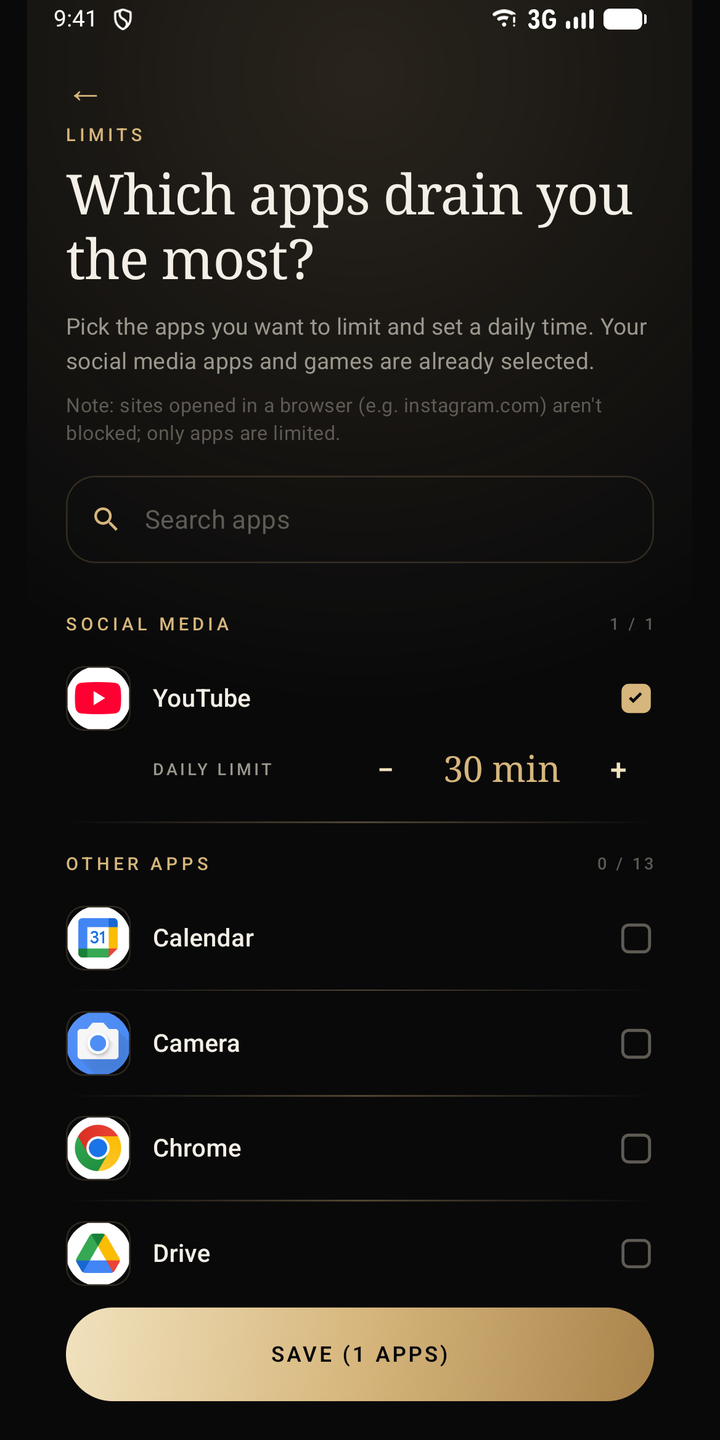
Limit
When time is up, the app closes and a calm block screen opens. The numbers come from your phone's own usage records.
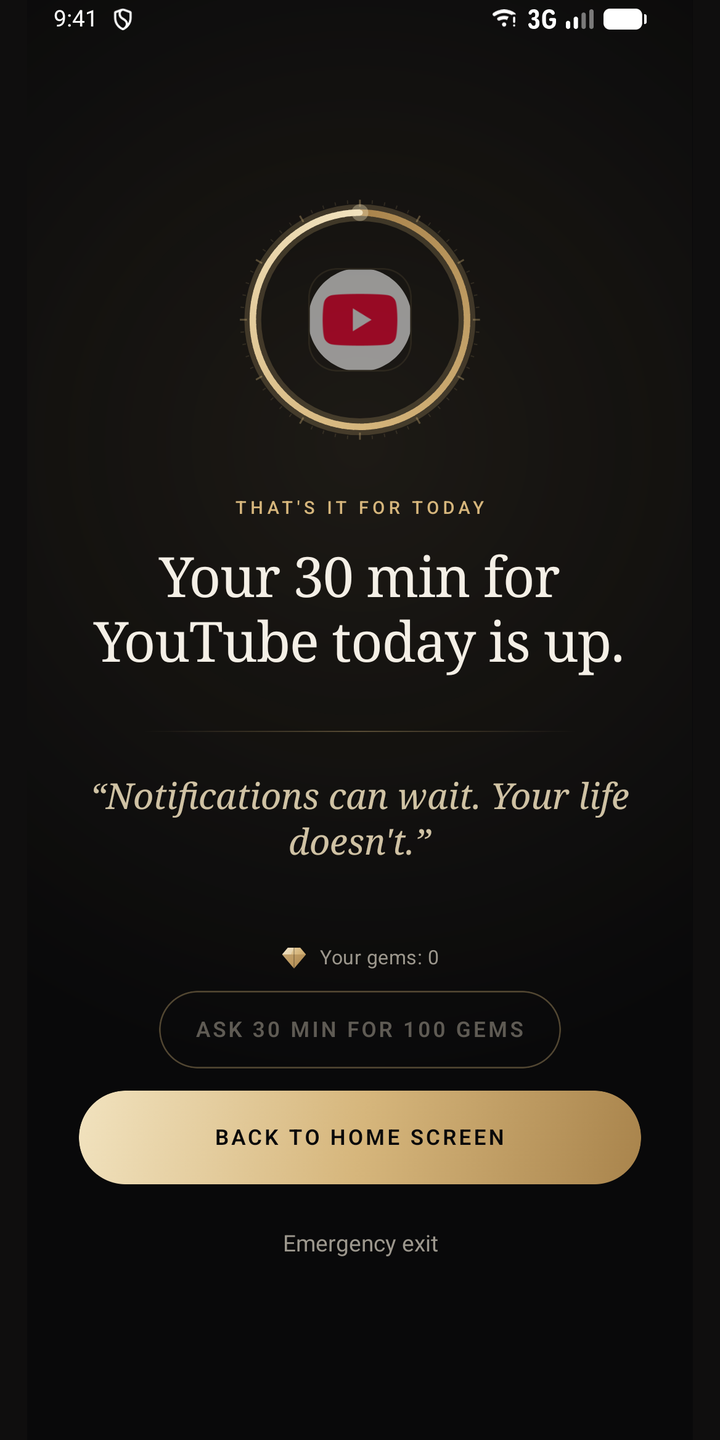
Grow
Every day you stay within your limits adds a day to your streak. Earn gems, unlock badges.
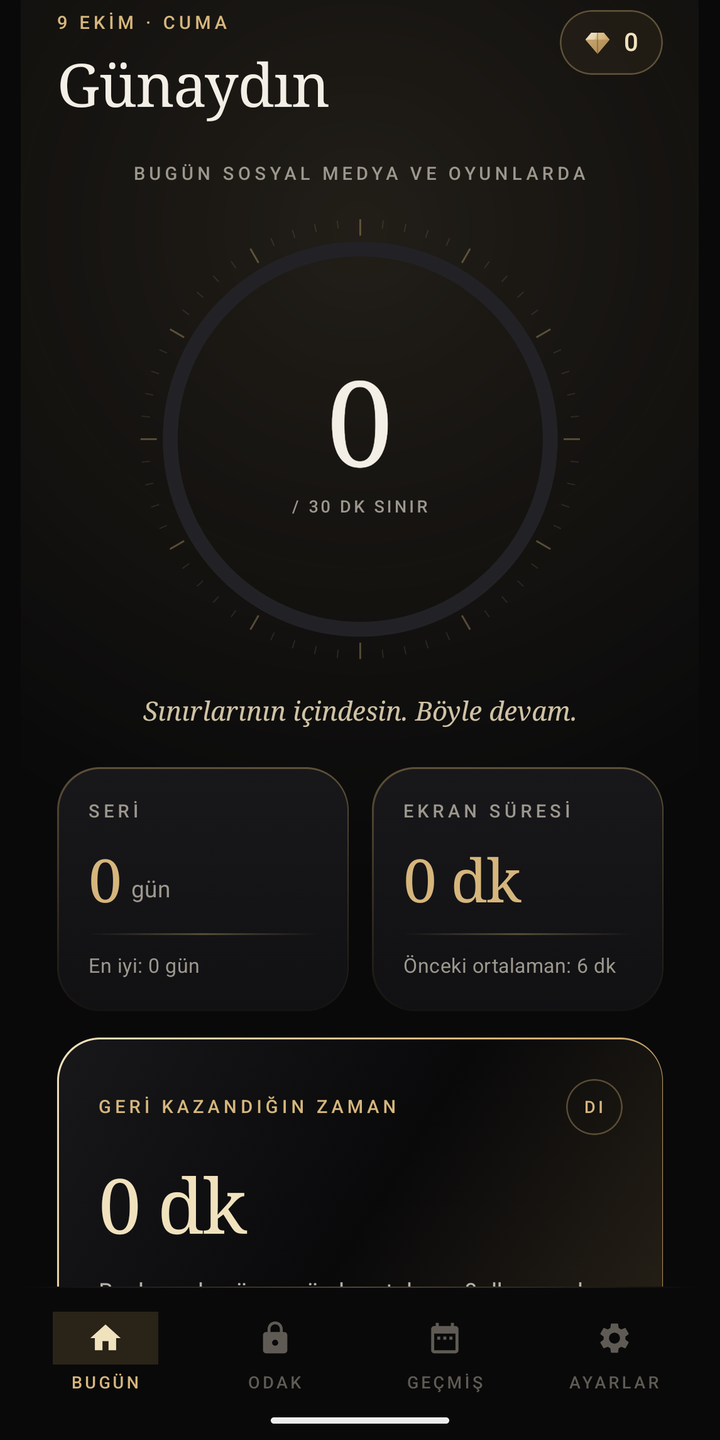

Everything you need, nothing more.
Daily limits
Instagram, TikTok, YouTube, X, games… Give each app its own daily time.
Block screen
When the limit is reached the app locks and a calm screen takes its place.
Streak
Each day within your limits extends your streak. Exceed a limit and it breaks.
Gems and 16 badges
Successful days earn gems; badges unlock at streak milestones.
Streak shield
Spend gems on a shield to protect your streak on a hard day.
Focus mode
Lock your limited apps completely for a while, in strict no-exit mode if you like.
Scheduled blocking
For example, keep chosen apps closed from 23:00 to 07:00.
Pomodoro
Work 25 or 50 minutes, break 5 or 10.
Allowlist mode
Only the apps you choose stay open; everything else closes.
Focus Score
See how your day went as a single score from 0 to 100.
Weekly report
A report that sums up how your week went.
Notification blocking
Optional: notifications from locked apps go quiet too. Notification contents are never read.
Small rewards, a lasting habit
Every successful day earns gems. Badges unlock at streak milestones (7, 30, 100 days); there are 16 badges in total. On a hard day you can protect your streak with gems.
Illustration
Your day in one number
The Focus Score sums up your day from 0 to 100, and the weekly report sums up your week. You see your progress in numbers, not guesses.
Illustration; your own score is calculated from your usage.
Focus with no way out.
Deep Focus is Offlayn's strict mode: it cannot be ended before the time is up. From 15 minutes to 1.5 hours, for study, work or family time.
- No early exit.
In strict mode there is no button to end the session early; the lock opens by itself when time is up. - Uninstall and force-stop screens are covered.
While Deep Focus is active, the screens needed to remove or stop the app are covered. - Changing the clock does not help.
Changing the phone's clock neither extends nor shortens the session. - What matters stays open.
Phone, Messages, Contacts and Settings are never locked.


Set the limit together.
Link your child's phone to your account and set the limits from your own phone. You approve or reject requests for extra time.
- Parent accountYou sign in with your own account and set up family mode.
- 6-character invite codeYour child's phone joins with the code; no email, password or card for the child.
- Limits from afarYou change your child's limits from your own phone.
- Extra time: asked with gems, approved by youYour child asks for extra time with gems; you approve or reject. If you reject, no gems are deducted.
- Last seen and blocking statusYou can see when your child's phone was last seen and whether blocking is on.
- Parent PINSettings on the child's phone are protected with a PIN.
Enter the invite code on your child's phone
Illustration
Illustration
A parent-panel-only mode is coming soon.
The same quiet, on your computer.
The Chrome extension applies the same limits, schedules and focus settings on your computer.
- Pairs with your phone using an 8-character code.
- You do not escape to the same distractions on your computer.
How do I install it?
- The extension is coming to the Chrome Web Store. During the beta we email the install link to participants.
- Add the extension to Chrome and click its icon.
- On your phone, go to Settings → Connect a computer and type the 8-character code. That is it.
That is enough for today.
Your limit is used up. See you tomorrow.Sample pairing code
Your data stays yours.
No ads, and your data is never sold. Only what the app needs to work goes to the server.
What we collect
- Your account (email) and settings
- Your limits and streak
- Your family features (invite code, extra-time requests)
- What your subscription needs
- Data is stored in the EU (Frankfurt)
What we never read
- Your screen content
- Your messages
- Your passwords
- The contents of your notifications
- You can delete your account in the app any time
Try it 7 days first.
There is no free version; every plan starts with a 7-day free trial.
- All features (including strict focus mode and notification blocking)
- 1 child phone
- Cancel any time in Google Play
- Everything in the monthly plan
- One payment for the whole year
- Cancel any time in Google Play
- Everything in Premium
- Up to 5 child phones
- Monthly or yearly; cancel any time in Google Play
7-day free trial. It starts through Google Play and asks you to add a payment method; if you cancel within 7 days you are not charged. After the trial the subscription renews automatically. Prices are for Turkey; Google Play shows its own price in each country.
Your questions, answered plainly.
Which phones does it work on?
Android first. The iPhone version comes later; if you apply with an iPhone, we will invite you when the iOS version starts.
How do limits work? Can I cheat?
The numbers come from your phone's own usage records, not from what you report. When a limit is reached the app is locked and the block screen opens.
Is there a way around the block?
To be honest: Android safe mode or ADB can bypass the blocking. Offlayn is a tool that supports your decision, not an absolute lock against tampering.
Is it free?
You try it free for 7 days; after that the subscription is paid. There is no free version. The trial starts through Google Play and needs a payment method; if you cancel within 7 days you are not charged.
Does my child need an email or a card?
No. Your child's phone joins your account with a 6-character invite code; no email, password or payment method is needed for the child.
Does it read my messages or notifications?
No. Your screen content, messages, passwords and notification contents are never read. The accessibility service is used only to see which app was opened and to show the block screen.
Do Phone and Messages get locked too?
No. Phone, Messages, Contacts and Settings are never locked. The block screen always has an emergency exit.
Where is my data stored?
Only the data needed for your account, limits, streak, family features and subscription goes to the server, stored in the EU (Frankfurt). You can delete your account from within the app at any time.
What happens if I apply for the beta?
You fill in the form; if you are selected for the closed test, we write to you by email. We cannot promise everyone will be selected.
Apply for the beta.
We are looking for people to try Offlayn before launch. Fill in the form; if you are selected, we will write by email.
- Android first. If you apply with an iPhone, you will be invited when the iOS version starts.
- You can apply for yourself, your child, or both.
- Your details are used only for the beta. Privacy notice
Your application is in.
Thank you. We sent a confirmation to your email address; if it doesn't arrive within a few minutes, check your spam folder. If you are selected for the closed test, we will write to you at the same address.
If you change your mind, just write to iletisim@offlayn.com.